

Law firm website maintenance services should protect more than your WordPress software.
They should protect the route a potential client takes from landing on your website to successfully contacting your firm.
That includes your website security, backups and updates.
It also includes your contact forms, booking links, email notifications and mobile pages.
A website can remain online while quietly losing enquiries.
That is the risk many basic maintenance plans fail to address.
Are law firm website maintenance services worth paying for?
Website maintenance is worth paying for when your website plays a role in bringing new clients into your firm.
Your website may help people:
- find your firm through Google
- understand whether you handle their matter
- compare you with another solicitor
- check your experience and credibility
- call your office
- request a callback
- book an initial conversation
- send confidential details through a form
Each part of that journey needs to work.
A law firm website is not properly maintained because somebody updated the plugins last Tuesday.
It is properly maintained when the software is secure, the main pages work and genuine enquiries still reach the right people.
What are law firm web maintenance services?
Law firm web maintenance services keep your website secure, current and working correctly.
For a WordPress website, this will usually include:
- WordPress core updates
- theme and plugin updates
- regular backups
- security monitoring
- uptime monitoring
- contact form testing
- mobile checks
- broken link checks
- speed and performance reviews
- technical support
- small website changes, depending on the agreement
WordPress is the main focus of this article because it is widely used and relies on several moving parts.
Its core software, theme, plugins, hosting and third-party connections all need to work together.
The principles still apply to other platforms.
A Squarespace, Wix or custom-built website can also suffer from failed forms, broken links, inaccurate information or poor mobile performance.
The platform changes.
The commercial risk does not.
The website can look fine while the enquiry route is broken
The most obvious website problem is when the whole site goes offline.
That is also one of the easiest problems to notice.
The quieter faults often cause more damage.
Imagine someone visits your family law page.
They read the information, complete the contact form and see a message confirming it was sent.
From their side, the enquiry worked.
They now expect your firm to respond.
But the notification was sent to an old email address.
Or the website stopped sending messages after a hosting change.
Or the enquiry should have entered your CRM, but the connection failed.
Your team never receives it.
You do not know an opportunity was lost.
The potential client assumes your firm ignored them and contacts somebody else.
This is why proper website maintenance needs to test the complete enquiry route.
Seeing a confirmation message is not enough.
Someone needs to check:
- The form accepts the information.
- The message reaches the correct inbox.
- The information enters the CRM where required.
- The potential client receives the right confirmation.
- Your team knows what to do next.
Maintenance should protect the handover between your website and your people.
What should law firm web maintenance services include?
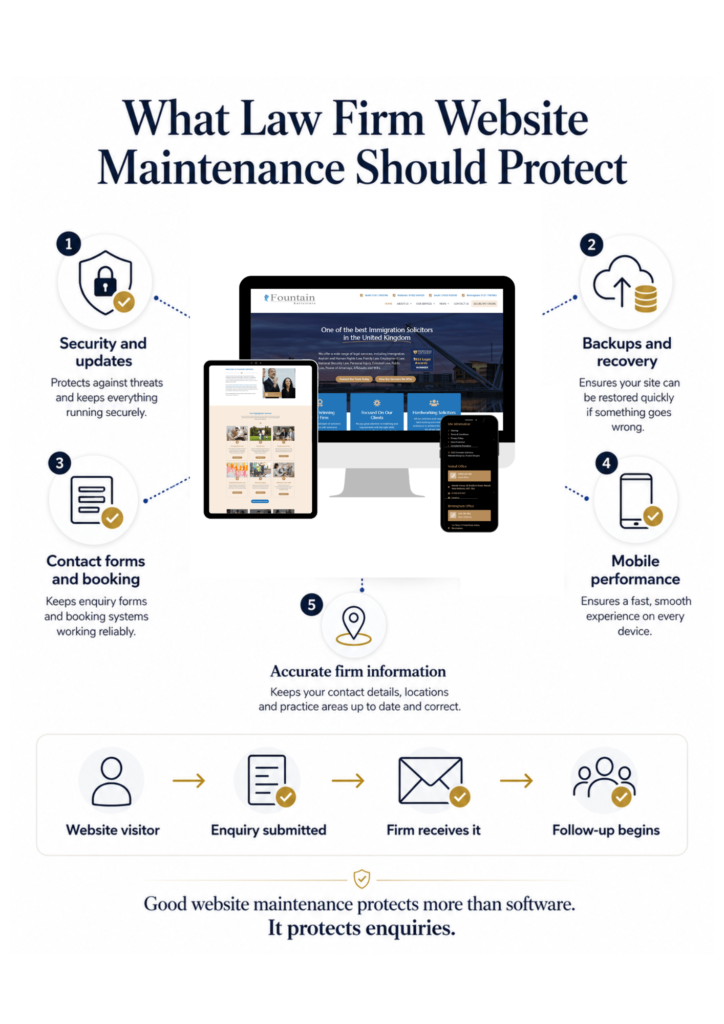
A useful maintenance service should protect five main areas.
1. WordPress updates and security
WordPress recommends taking regular backups and backing up your website before an upgrade. WordPress websites need regular software updates.
These can include updates to:
- WordPress itself
- the active theme
- contact form plugins
- security plugins
- SEO plugins
- page-building software
- booking tools
- tracking tools
- other third-party features
Updates can fix security weaknesses and compatibility problems.
They can also create new problems when a plugin conflicts with the theme or another part of the website.
That is why responsible maintenance involves more than clicking “update”.
The process should include:
- taking a current backup
- reviewing available updates
- applying them safely
- checking the website afterwards
- testing important functions
- restoring the previous version if something breaks
Ask your maintenance provider what they check after an update.
If the answer is unclear, the service may only cover the update itself.
2. Backups you can recover from
A backup gives your firm a route back when something goes wrong.
You may need it after:
- a failed update
- accidental content deletion
- a security problem
- a hosting fault
- damage caused by a third-party tool
- an error made while editing the website
Your provider should be able to explain:
- what is backed up
- how often backups run
- where they are stored
- how long they are kept
- whether they are separate from the live website
- how the website would be restored
A backup that has never been checked may not provide the protection you think it does. The National Cyber Security Centre also recommends keeping regular backups and testing that information can be restored from them.
Ask when your provider last tested its recovery process.
3. Contact forms and booking routes
Your forms are among the most commercially important parts of your website.
They should be tested regularly and after any change involving:
- the website
- hosting
- email delivery
- the form plugin
- spam protection
- your CRM
- booking software
- staff email addresses
A proper test should follow the route a potential client takes.
That means completing the form from the website rather than sending a test email directly to the firm.
Check:
- whether the form can be completed
- whether it works on mobile
- whether the message reaches the correct person
- whether the sender receives confirmation
- whether tracking records the enquiry
- whether the thank-you page appears
- whether the next step is clear
This check takes minutes.
A failed form can go unnoticed for weeks.
4. Mobile and browser checks
Your website may work on your office computer and fail on somebody else’s phone.
Common problems include:
- buttons that are difficult to press
- forms that extend beyond the screen
- pop-ups covering the page
- overlapping text
- slow images
- phone numbers that cannot be clicked
- menus that do not open
- booking tools that are hard to use
Do not limit mobile checks to the homepage.
Review the pages most likely to generate an enquiry:
- main practice-area pages
- location pages
- solicitor profiles
- contact page
- booking page
- enquiry forms
Our guide to fixing mobile website problems explains what to look for across your main pages.
5. Accurate content and trust information
Technical maintenance keeps the website running.
Content maintenance keeps it credible.
A law firm website can lose trust when it contains:
- former employees
- incorrect office details
- unavailable services
- old telephone numbers
- broken profile photographs
- expired accreditations
- outdated prices
- old regulatory information
- inaccurate opening hours
- policies that no longer reflect the firm
Small inaccuracies create doubt.
They can also send enquiries to the wrong place.
Your firm should have a process for telling the website provider when something changes.
The provider can update the website.
Your firm still needs to confirm that legal, regulatory and compliance information is correct.
Our Website Care Plan helps keep your website secure, updated and working properly. It covers the ongoing technical care your website needs, including the checks that help protect forms, pages and other important connections.
What website maintenance cannot fix
A secure website can still generate few enquiries.
Regular maintenance cannot fix:
- unclear positioning
- generic practice-area pages
- weak calls to action
- missing evidence
- confusing navigation
- a difficult enquiry process
- slow responses from the firm
- poor follow-up after the first contact
This distinction matters.
Website maintenance protects what is already there.
It does not automatically make the website better at persuading the right person to contact you.
A site may have every plugin updated and every backup completed while still failing commercially.
That is why we separate maintenance from improvement.
Maintenance
Keeps the website secure, current and operational.
Improvement
Strengthens the message, pages and route to enquiry.
Growth
Brings more of the right people to a website that can turn attention into action.
Your firm may need one of these.
It may need all three.
The recommendation should follow the problem rather than the service an agency wants to sell.
How often should a law firm website be maintained?
There is no single schedule that suits every website.
A small firm with a simple website may need less manual work than a multi-office firm running advertising, publishing content and collecting many enquiries.
A sensible starting point is:
Ongoing
- uptime monitoring
- security monitoring
- scheduled backups
Monthly
- WordPress updates
- plugin and theme updates
- form testing
- booking-route testing
- mobile checks on key pages
- broken link checks
- security review
- backup confirmation
Quarterly
- wider mobile and browser review
- website user access review
- enquiry tracking check
- key content review
- backup recovery check
- review of third-party connections
Annually
- full website review
- content audit
- privacy and policy review
- plugin and licence review
- accessibility review
- ownership and account access review
Your provider should adjust this schedule when the website changes.
A major plugin update, new practice-area page or CRM change should trigger an extra check.
Warning signs your website is not being maintained properly
Your current arrangement may be too basic when:
- nobody can tell you when the forms were last tested
- updates happen without a current backup
- you receive no record of what was checked
- former staff still have administrator access
- the provider does not check mobile pages
- nobody knows where backups are stored
- website changes regularly cause other problems
- old contact details remain online
- your team only discovers faults after a potential client reports them
- nobody checks whether enquiries reach the correct person
- you do not control your domain, hosting or main accounts
You do not need a long report filled with technical terms.
You should still be able to understand:
- what was checked
- what was updated
- what went wrong
- what was fixed
- what needs attention next
Questions to ask a website maintenance provider
Ask these questions before signing an agreement.
Do you test our forms?
Do not assume form testing is included.
Ask how often it happens and what the provider checks after submission.
What happens after an update?
The provider should check important pages and functions, not only whether the website remains online.
How quickly do you respond to a serious fault?
Clarify:
- normal support hours
- urgent response times
- what counts as an emergency
- whether out-of-hours help is available
- whether emergency work costs extra
What happens if the website is compromised?
Ask what the provider will do, what is included and what could create an additional charge.
How do backups work?
Ask where they are stored and how the provider knows they can be restored.
What does the plan exclude?
Common exclusions may include:
- new pages
- copywriting
- redesign work
- custom development
- SEO
- marketing campaigns
- recovery from an existing hack
- third-party licence costs
- legal or compliance advice
Clear exclusions help you compare services properly.
Who owns the website and accounts?
Your firm should understand who controls:
- the domain
- hosting
- WordPress
- analytics
- Search Console
- form records
- CRM connections
- email delivery tools
- backup access
A support agreement should not leave you locked out of your own digital assets.
Is managed WordPress hosting enough?
Managed WordPress hosting can cover part of the job.
It may include:
- server management
- automatic backups
- security tools
- uptime monitoring
- some WordPress updates
It may not include:
- manual form tests
- booking checks
- CRM checks
- mobile page reviews
- content updates
- broken link checks
- enquiry tracking
- support with website changes
Read the scope carefully.
“Managed” does not always mean somebody is checking the complete client journey.
Can your firm manage WordPress maintenance internally?
Yes, provided someone has the skills, access and time.
The work needs a named owner.
That person should know:
- how to take and restore backups
- how to update WordPress safely
- how to test forms
- how to spot security warnings
- how to check mobile pages
- who to contact when something breaks
Internal maintenance often becomes unreliable when it belongs to everybody and nobody.
A task that is “handled by the team” can easily disappear during a busy month.
What does ongoing website care look like in practice?
Fountain Solicitors has worked with Krystal Designs for more than 15 years.
During that time, the firm has grown from one office to five. Its website and marketing have also changed through three rebuilds, ongoing SEO, Google Business Profile work and paid campaigns.
The firm now receives more than 60 website enquiries per month.
Routine maintenance did not create that result on its own.
The relevant lesson is that a website supporting a growing firm cannot be launched once and then ignored.
New offices open.
Practice areas change.
Teams grow.
Marketing campaigns introduce new enquiry routes.
The website needs to change with the firm while its existing forms, pages and connections continue working.
You can read the full Fountain Solicitors case study to see the wider work and recorded results.
How maintenance protects enquiries
Website maintenance supports enquiry protection in four ways.
It prevents avoidable failures
Regular checks can find software conflicts, broken forms and expired connections before they cause a larger problem.
It shortens the time a problem stays hidden
Monitoring and testing help your provider notice a fault sooner.
It protects the client experience
A working mobile page, clear confirmation and reliable form make the firm feel organised.
It protects work you have already paid for
SEO, advertising and content become less valuable when the website receiving that attention does not work properly.
Maintenance does not create demand by itself.
It helps stop existing opportunities from being wasted.
How do you know whether the website is supporting enquiries?
Do not judge website health using traffic alone.
Track:
- completed contact forms
- calls from the website
- booked initial conversations
- enquiry source
- response time
- missed calls
- failed form alerts
- suitable enquiries
- enquiries that became clients
This helps you separate a technical problem from a message, traffic or follow-up problem.
For example:
- Traffic but no form activity may point to the page or offer.
- Form submissions that never arrive point to a technical problem.
- Enquiries that arrive but receive no reply point to follow-up.
- Very little suitable traffic may point to visibility.
The numbers help you fix the right part first.
Our Monthly Enquiry Growth Support covers ongoing improvements for firms that already have the right foundation and want to strengthen visibility, trust, follow-up and enquiry flow.
Frequently asked questions
Do all law firms need website maintenance?
The honest answer
Law firm web maintenance services are worth paying for when they protect something commercially important.
That means more than keeping WordPress updated.
The service should protect:
- the website
- its security
- its backups
- its important pages
- its contact forms
- its third-party connections
- the route a potential client takes to reach your team
Maintenance keeps a working route working.
It cannot fix an unclear message, a weak decision path or poor follow-up.
Your first job is to understand which problem you actually have.
Find out what is holding your enquiries back
Your website may need better maintenance.
It may have a form or tracking problem.
It may work technically but fail to give the right person a reason to contact you.
Book a More Clients Call and we will review the current enquiry path with you.
You will leave with:
- a clearer view of where enquiries may be getting lost
- the main issue that needs attention
- the order in which it should be addressed
- an honest recommendation about the next step
Find the problem first. Then decide what your firm actually needs.