For most firms, improving what you have is the better starting point. Most website problems are not as structural as they feel, and a full rebuild can end up fixing a problem that was never really about the website’s foundations.
That is not true for every firm. Sometimes a rebuild genuinely is the only sensible option because the platform, ownership, structure or business direction has changed too much.
The trick is knowing which situation you are actually in. That decision should not be based on how tired you feel when you look at the current site.
Here is a practical framework to help you work it out properly, in about 20 minutes.
Key Takeaways
- A rebuild and an improvement plan solve different problems
- Frustration with your website is not the same as evidence it needs replacing
- A rebuild works when the structure, platform or ownership is the constraint
- An improvement plan works when specific parts are holding enquiries back
- The six checkpoints below help you decide before you spend money
What Is the Difference Between a Website Redesign and a Rebuild?
A website rebuild means starting again. That usually means a new structure, new design, new build, and often new content throughout.
A rebuild is the right call when the underlying setup is genuinely holding the business back. That might mean the platform is outdated, the site structure no longer fits the business, or you do not properly own or control what you need.
A website improvement plan is different. It means working with what you already have and fixing the specific parts that are not doing their job.
That could mean improving the homepage message, rewriting key service pages, fixing the enquiry route, testing forms, improving trust signals or making the next step clearer. It is usually less disruptive and often faster to learn from.
Neither option is automatically better. Each one solves a different kind of problem.
Why This Decision Gets Expensive Quickly
A lot of firms jump to “we need a new website” because the current one is frustrating. That frustration may be completely valid.
The problem is that frustration does not tell you what is actually broken. A website can feel tired and still be fixable, while a newer-looking website can still fail to bring in enquiries.
That is where money gets wasted.
If the real issue is the message, rebuilding the whole site will not help unless the message changes too. If the real issue is follow-up, a prettier website will not stop good enquiries going cold.
If the real issue is ownership, access or the platform itself, then patching individual pages may not be enough. You may need a clean rebuild so the business has proper control from the start.
The decision is not “big project or small project”. The decision is “what is the direct fix for the problem we actually have?”
Where a Rebuild Works Well
A rebuild makes sense when the platform itself is the constraint. If your current site runs on outdated technology that cannot support what you need, small fixes may only delay the real decision.
It also makes sense when the structure no longer supports how your business works. A firm that has added new services, changed its client base, expanded locations or repositioned itself may have a site built around a business that no longer exists.
Ownership problems can force the decision too. If you do not control your domain, hosting, content, analytics or website files properly, sometimes the cleanest path is starting again with everything under your control from day one.
A rebuild can also make sense when the whole site is fighting against the buyer journey. If every important page is unclear, the navigation is messy, the content is out of date and the platform is awkward to work with, improvement may become more expensive than rebuilding properly.
Where a Rebuild Falls Short
A rebuild is expensive and disruptive. It takes time, attention and usually a lot more decision-making than firms expect.
It also solves nothing if the actual problem was never the platform or structure. Firms that rebuild because they are frustrated with results can end up in the same position, just with a newer-looking site.
That is why “we need a new website” can be a risky starting point. It sounds decisive, but it may skip the most important question.
What is actually stopping the website from bringing in the right enquiries?
If nobody answers that before the rebuild starts, the same problem can be rebuilt into the new site.
Where an Improvement Plan Works Well
An improvement plan works best when the website is basically sound, but specific parts are holding enquiries back. That could be the homepage message, the service page structure, the contact route, the trust signals or the way forms and calls are handled.
This is often the better first step when the platform still works and you own the website properly. You can fix the part that is blocking enquiries without paying to rebuild everything around it.
An improvement plan can also be useful when you are not sure where the problem sits yet. Instead of committing to a rebuild, you can inspect the parts that matter and act on the clearest gap first.
That is especially useful if your reports are unclear, your enquiries are inconsistent or you have already spent money before without knowing what changed. You get a clearer starting point before making a bigger decision.
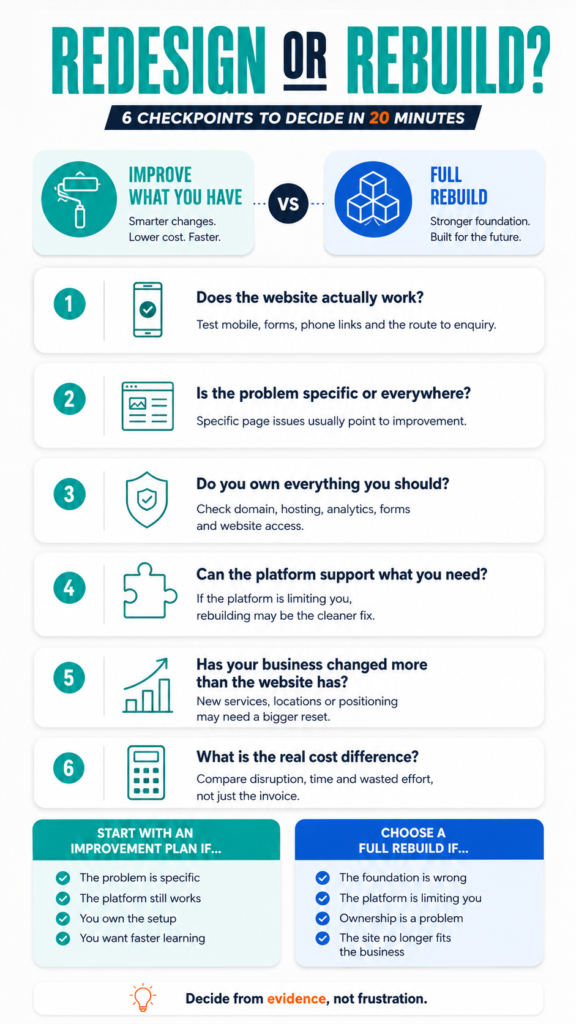
The Six Checkpoints to Decide
Work through these six checkpoints before deciding anything. You do not need a long strategy day for this, but you do need to be honest about what you find.
1. Does Your Website Actually Work?
Do not start with whether you like how it looks. Start with whether it works.
Open it on your phone and act like a real visitor. Can you understand what the firm does, find the right service, trust the business and take the next step without frustration?
Then test the practical parts. Submit the contact form, click the phone number, check the confirmation message and make sure the enquiry reaches the right inbox.
If the site mostly works but a few things are broken, that may point to an improvement plan. If the entire experience is awkward from start to finish, that may point to a deeper structural problem.
2. Is the Problem Specific or Everywhere?
A weak homepage message is often fixable. A confusing service page can usually be rewritten.
A broken contact form can be repaired. A missing case study section can be added.
But if every important page is unclear, every route to enquiry is clunky and every decision point feels weak, the issue may be bigger than one or two fixes. At that point, you may be looking at a structure problem.
The difference matters because specific problems should not automatically trigger a full rebuild. They should trigger a focused fix.
3. Do You Own Everything You Should?
Ownership can change the decision completely. If you do not control the assets behind your website, improving the current site may be harder than it should be.
Check whether you have access to your domain, hosting, website files, analytics, Search Console, forms and enquiry data. You do not need to manage all of it yourself, but the business should not be locked out of its own website setup.
If your current provider controls key assets in a way that limits you, that is not just an inconvenience. It can become a structural constraint.
If you are not sure what should belong to you, read Website Ownership: Who Owns Your Website After It’s Built? before deciding whether to rebuild.
4. Can the Platform Support What You Need?
Some platforms are fine for where the business used to be, but not where it is going. That does not always mean they are bad platforms.
It may simply mean your needs have changed.
If you cannot add the right pages, improve key templates, track enquiries properly or manage content without constant workarounds, the platform may be holding you back. That is different from needing a better headline or a cleaner contact page.
A platform problem usually points towards a rebuild. A content or messaging problem usually points towards improvement.
5. Has Your Business Changed More Than the Website Has?
Your website should reflect the business you are now, not the business you were three years ago. If your services, client base, locations, pricing, team or positioning have changed, the site may be out of step.
This is common in firms that have grown through referrals. The business moves on, but the website stays frozen in an older version of the firm.
That does not always mean you need a full rebuild. Sometimes the structure is still usable, but the message and key pages need serious improvement.
Other times, the site is built around an old business model and cannot support the next stage properly. That is when a rebuild becomes more sensible.
6. What Is the Real Cost Difference?
A rebuild is not only a financial cost. It also costs time, attention and decision-making energy.
An improvement plan is usually less disruptive and often faster to learn from. You can target the clearest gap, watch what changes and decide the next move from there.
That said, patching a site that is fundamentally wrong can cost more over time. If the platform, ownership or structure is the real problem, repeated small fixes may become a false economy.
The question is not which option looks cheaper today. The question is which option solves the actual problem with the least wasted effort.
Website Redesign vs Rebuild: Quick Comparison
| Question | Improvement Plan | Full Rebuild |
|---|---|---|
| Best when | Specific parts are holding enquiries back | The platform, structure or ownership is the constraint |
| Typical focus | Message, pages, forms, CTAs, trust, tracking | New structure, new design, new build, new setup |
| Speed | Often faster to test and learn from | Usually takes longer before results are visible |
| Disruption | Lower disruption | Higher disruption |
| Risk | Can under-fix if the structure is broken | Can over-fix if the real problem was specific |
| Best first step | Diagnose the clearest gap | Confirm the current setup cannot support what you need |
This is the simplest way to think about it. Improve when the problem is specific. Rebuild when the foundation itself is wrong.
The Recommendation
If most of your answers point to a specific, fixable problem, start with improvement. It is usually less disruptive, easier to test and better for learning what actually changes.
If your answers point to ownership you do not have, a platform that cannot support the business or a structure that no longer matches what your firm does, rebuild properly. Do not keep patching around a foundation that is working against you.
Either way, the decision should follow from what is actually broken. It should not follow from how tired you are of looking at the current site.
A good decision starts with diagnosis, not frustration.
What Most Firms Get Wrong
Most firms choose the size of the solution before they understand the size of the problem. That is how they end up overspending or under-fixing.
A frustrated firm may choose a rebuild because it feels like a clean break. But if the new site carries the same unclear message, weak enquiry route or poor follow-up, the clean break does not last.
Another firm may avoid a rebuild because it feels expensive. But if the current setup is locked down, outdated or impossible to improve properly, avoiding the rebuild can become more expensive over time.
The mistake is not choosing improvement or rebuild. The mistake is choosing either one without knowing why.
How Reporting Helps You Decide
Good reporting can make this decision easier. It shows whether the website is failing everywhere or only in specific places.
If your reports show traffic but no enquiries, the issue may be the page message or decision path. If your reports show enquiries but no clients, the issue may sit after the enquiry.
If your reports are full of numbers but do not explain what changed, it is hard to make a good decision. You may end up rebuilding because nobody can tell you what actually needs fixing.
If you are getting reports but still cannot tell what changed, read What Should a Website Company Report After Launch?. It shows what useful post-launch reporting should actually include.
The Bottom Line
The question is not whether you feel like rebuilding. The question is what is actually broken, and what the most direct way to fix it happens to be.
Most of the time, the better first move is an improvement plan targeting a specific gap. Sometimes, the right decision is a full rebuild done properly.
Work through the six checkpoints above before spending anything. It is the difference between fixing the right problem and paying twice to fix the same one.
Not sure whether your website needs a rebuild or a focused improvement plan?
Book a More Clients Call. We’ll help you look at what is actually holding the website back, so you can decide whether to fix what you have or rebuild properly.